• What We Do
    • Security
      • Business Recovery Planning
      • Cyber Security – Business
      • Cyber Security – Home Users
      • Cyber Security – Software Developers
    • Standards (BSI/ISO)
    • Solutions
      • reMarkable
    • CUPAS
  • Links
    • The IAP
    • The RSA
    • The BCS
    • Llanelli Chamber of Trade and Commerce
    • 4 The Region
    • UK Cyber Security Council
  • In the Community
  • Blog
  • 2026 Diary Template Generator – For the reMarkable

    As 2026 rapidly approaches, we have updated our template generator for the reMarkable, adding some new functionality, this now supports the colour feature of the reMarkable Pro and we have added a couple of features, that allow you to add annual events like birthdays and anniversarys and these will be written into your diary on those days. In addition, you can add weekly events, like ‘Meet Mum for Coffee’ @ 10am on Tuesday etc. These diary features do require you to edit the macro, but it is fairly self explanatory, and we expand on this in the training video.

    To use the generator, download the MS Word document file here, it will download.

    You should go to your download folder, right click the file and go to properties, then unblock the file. This will enable the macros option. You can then open it in MS Word, run the macro “CreateYearPlanner” and enter your details, select which sections of the planner you want. If you have a colour reMarkable, you can untick the Black & White button and have full colour.
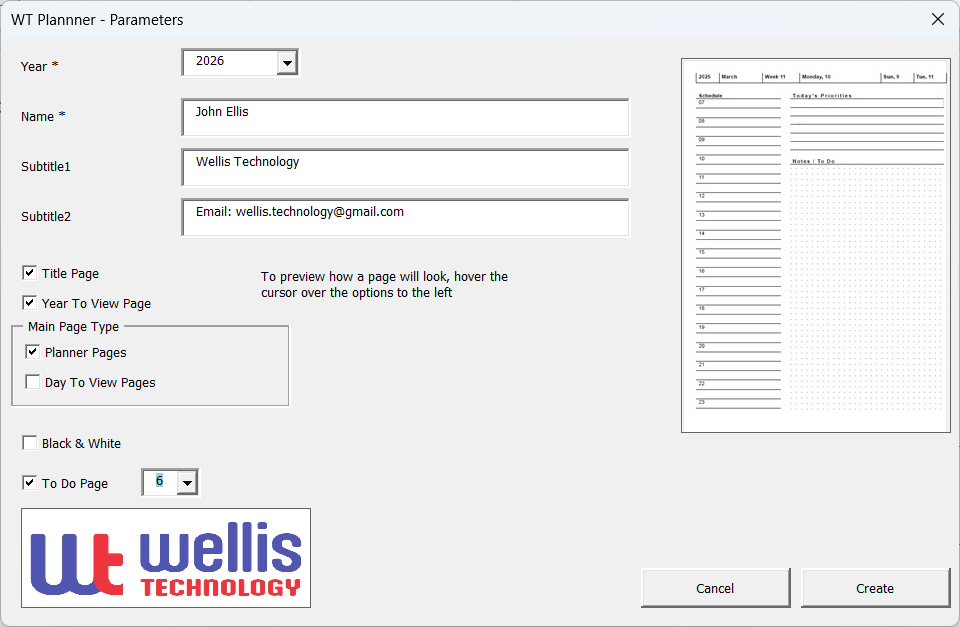
    Click “Create” and the macro will run for 10-15 minutes (depending on your PC) creating each page. It is creating a page for every day of the year!

    Save the outputted document as a PDF and Import this file into your reMarkable, and Viola! its ready to go.

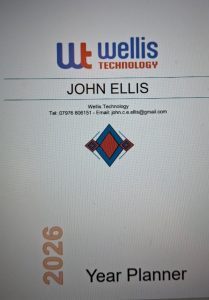
    You can of course edit the document before saving it, to add your own logos, add any diary appointments etc, to personalise it before saving it to PDF.

    To use the generator, see our simple guide

    If you have any ideas to improve the generator please let us know via our blog https://www.facebook.com/FreeRemarkableTemplates.

    Here are the links to other articles we have written about the reMarkable and the Templates.
    • 2026 Diary Template Generator – For the reMarkable
    • Updated reMarkable Diary Generator
    • Standard Forms Generator for the reMarkable
    • Customising the Created Diary
    • Customising the reMarkable Diary Generator
    • 2025 Diary Template Generator – For the reMarkable
    • reMarkable Pro – Launched

    John Ellis

    28/11/2025
  • Updated reMarkable Diary Generator

    With 2026 fast approaching, I’m pleased to announce that the free Diary Generator is now almost complete.

    We’ve added new functionality, including support for regular weekly events (such as meetings and appointments) and diary entries for special dates like birthdays and anniversaries.

    The template will be officially launched soon, along with a step-by-step video guide showing how to use it. You’ll be able to use it offline, print it, or access it across different devices – whichever suits you best.

    Looking ahead, we plan to extend its features throughout 2026 and bring all of our form generators together into one integrated system.

    As always, your feedback and suggestions are very welcome, so please do share any ideas for future improvements.

    A full release announcement will follow shortly.

    John Ellis

    20/10/2025
  • Standard Forms Generator for the reMarkable

    Here is how to use our Standard Forms Generator and a link to the Generator itself. It is totally free and if you have any suggestions or additions, please let us know.

    Click Here for the Generator, just download it and use MS Word to run the Macro.

    Here are the links to other articles we have written about the reMarkable and the Templates.

    • 2026 Diary Template Generator – For the reMarkable
    • Updated reMarkable Diary Generator
    • Standard Forms Generator for the reMarkable
    • Customising the Created Diary
    • Customising the reMarkable Diary Generator
    • 2025 Diary Template Generator – For the reMarkable
    • reMarkable Pro – Launched

    John Ellis

    10/10/2024
  • Customising the Created Diary

    You have run the Diary Template Generator, now before saving it, why not add some additional detail.

    Here are the links to other articles we have written about the reMarkable and the Templates.

    • 2026 Diary Template Generator – For the reMarkable
    • Updated reMarkable Diary Generator
    • Standard Forms Generator for the reMarkable
    • Customising the Created Diary
    • Customising the reMarkable Diary Generator
    • 2025 Diary Template Generator – For the reMarkable
    • reMarkable Pro – Launched

    John Ellis

    09/10/2024
  • Customising the reMarkable Diary Generator

    Here is a short video on customising the Microsoft Word document used as the generator for the reMarkable Diary Creator

    We will also shortly upload a short video on how to edit created diary to personalise it, prior to saving it as a PDF.

    Here are the links to other articles we have written about the reMarkable and the Templates.

    • 2026 Diary Template Generator – For the reMarkable
    • Updated reMarkable Diary Generator
    • Standard Forms Generator for the reMarkable
    • Customising the Created Diary
    • Customising the reMarkable Diary Generator
    • 2025 Diary Template Generator – For the reMarkable
    • reMarkable Pro – Launched

    John Ellis

    09/10/2024
  • 2025 Diary Template Generator – For the reMarkable

    As 2025 rapidy approaches, we have updated our template generator for the reMarkable, adding some new functionality.

    To use the generator, download the MS Word document file here, it will download.

    You should go to your download folder, right click the file and go to properties, then unblock the file. This will enable the macros option. You can then open it in MS Word, run the macro “CreateYearPlanner” and enter your details, select which sections of the planner you want.

    Click “Create” and the macro will run for 10-15 minutes creating each page. It is creating a page for every day of the year!

    Save the outputted document as a PDF and Import this file into your reMarkable, and Viola! its ready to go.

    You can of course edit the document before saving it, to add your own logos, add any diary appointments etc, to personalise it before saving it to PDF.

    To use the generator, see our simple guide

    If you have any ideas to improve the generator please let us know via our blog https://www.facebook.com/FreeRemarkableTemplates.

    Here are the links to other articles we have written about the reMarkable and the Templates.

    • 2026 Diary Template Generator – For the reMarkable
    • Updated reMarkable Diary Generator
    • Standard Forms Generator for the reMarkable
    • Customising the Created Diary
    • Customising the reMarkable Diary Generator
    • 2025 Diary Template Generator – For the reMarkable
    • reMarkable Pro – Launched

    John Ellis

    01/10/2024
  • reMarkable Pro – Launched

    In a much-anticipated move, reMarkable has unveiled its latest innovation, the reMarkable Pro. Launched yesterday, this groundbreaking device is set to redefine the digital note-taking experience with a blend of cutting-edge technology and user-centric design.

    A Leap Forward in Technology?

    While the reMarkable Pro represents a significant leap forward from its predecessors, boasting an array of features designed to enhance productivity and creativity. At its core, the Pro model continues reMarkable’s commitment to delivering a paper-like experience but with improvements that cater to modern needs.

    The reMarkable Pro comes equipped with a new 11.8 inch colour display, offering unparalleled clarity and detail. This advanced screen technology not only improves readability but also provides a more responsive and natural writing experience. The increased resolution ensures that even the smallest text and detailed sketches are crisp and clear.

    The reality is that the improvements to the reMarkable over the last few years our being realised more effectively in the Pro. For example allowing colours to be drawn as grey scales, which can then be read on a PC or Tablet in colour, has been realised. Our current understanding is that it currenlty supports a limited 9 colours. Along with other minor but important features, keeps the reMarkable at the forefront of the market.

    Instead of just 8GB of storage, there is now 64GB, a big plus. The device is heavier, but it does have a bigger screen area etc.

    Personally, I do not think I need to upgrade, as my reMarkable does exactly what it was designed for.

    Design and Build

    The reMarkable Pro maintains the sleek, minimalist design that the brand is known for, with a premium aluminum finish and a slim profile. The device is both lightweight and durable, making it ideal for on-the-go use. One big step forward for the Pro, is that it is a lot easier to get inside, and parts can be replaced easier.

    Availability and Pricing

    The reMarkable Pro is available for pre-order starting today, with an expected release date of October 15, 2024. The device is priced at £559, with optional accessories such as a keyboard folio and additional pen tips available for purchase.

    Conclusion

    With its array of enhancements and new features, the reMarkable Pro is poised to set a new standard in the world of digital note-taking and creative work. It offers a sophisticated, high-performance alternative to traditional paper and digital tablets, combining the best of both worlds in a single, innovative package. For professionals, students, and creatives alike, the reMarkable and reMarkable Pro are more than just a tool—it’s a transformative experience.

    Here are the links to other articles we have written about the reMarkable and the Templates.

    • 2026 Diary Template Generator – For the reMarkable
    • Updated reMarkable Diary Generator
    • Standard Forms Generator for the reMarkable
    • Customising the Created Diary
    • Customising the reMarkable Diary Generator
    • 2025 Diary Template Generator – For the reMarkable
    • reMarkable Pro – Launched

    John Ellis

    05/09/2024
GDPR – Legal – Contact Us

Website Created By Wellis Technology and Powered by WordPress